
Visualize
What Would I Look Like If I Lost Weight? 5 Ways to See It
Short answer
The most realistic way to see what you would look like if you lost weight is to edit a photo of yourself with an AI weight loss simulator set to a specific number of pounds — it keeps your face, clothes and background and changes only body fat. Free 3D body visualizers show a generic body at your height and weight, and ChatGPT can edit a photo but usually needs a carefully written prompt. As a rough guide, other people start to notice weight loss in your face after about 8–9 lbs, and at 10% of your body weight most people look visibly leaner in the face, neck and waist.
Key takeaways
- Photo-based AI simulators look most like you; 3D visualizers are free but generic.
- Faces show weight change early: ~1.33 BMI points (≈8 lb for women, ≈9 lb for men of average height) is noticeable to others.
- How dramatic a loss looks depends on its share of your body weight — 20 lb is 13% of 150 lb but under 7% of 300 lb.
- Where fat comes off first is largely genetic, so treat any preview as a plausible picture, not a prediction.
What are the ways to see what you would look like if you lost weight?
There are five practical options. They differ in what you put in (a photo or your measurements) and what you get out (your own photo, or a generic body):
| Method | You provide | You get | Looks like you? | Cost |
|---|---|---|---|---|
| AI photo weight loss simulator | A photo + a pound/kg target | Your own photo, edited to the target weight | Yes — face, hair, clothes kept | Paid per run (from $1.9 here) |
| 3D body visualizer | Height, weight, measurements | A rotating generic 3D body | No | Free |
| Avatar app (e.g. Model My Diet) | Height, body shape, current + goal weight | A customizable cartoon-style avatar | Loosely (skin tone, hair) | Free with ads |
| ChatGPT or another AI image editor | A photo + a free-text prompt | An edited photo | Usually, if prompted well | Free tier or subscription |
| Your own old photos | Pictures from when you were lighter | A real reference | Yes | Free |
If you want to see your face and body — not a mannequin — the photo route is the only one that answers the question directly. If you would rather not upload a photo at all, a 3D body visualizer such as the Max Planck Body Visualizer is the best free alternative. We compare all of these in detail in our guide to the best weight loss simulators.
What does an AI weight loss preview actually look like?
Below is a real output from our simulator: the same photo at its starting weight and after a 40 lb simulated loss. The face, hairline, shirt and background stay the same; the jaw, neck, chest and waist change. Drag the handle to compare.
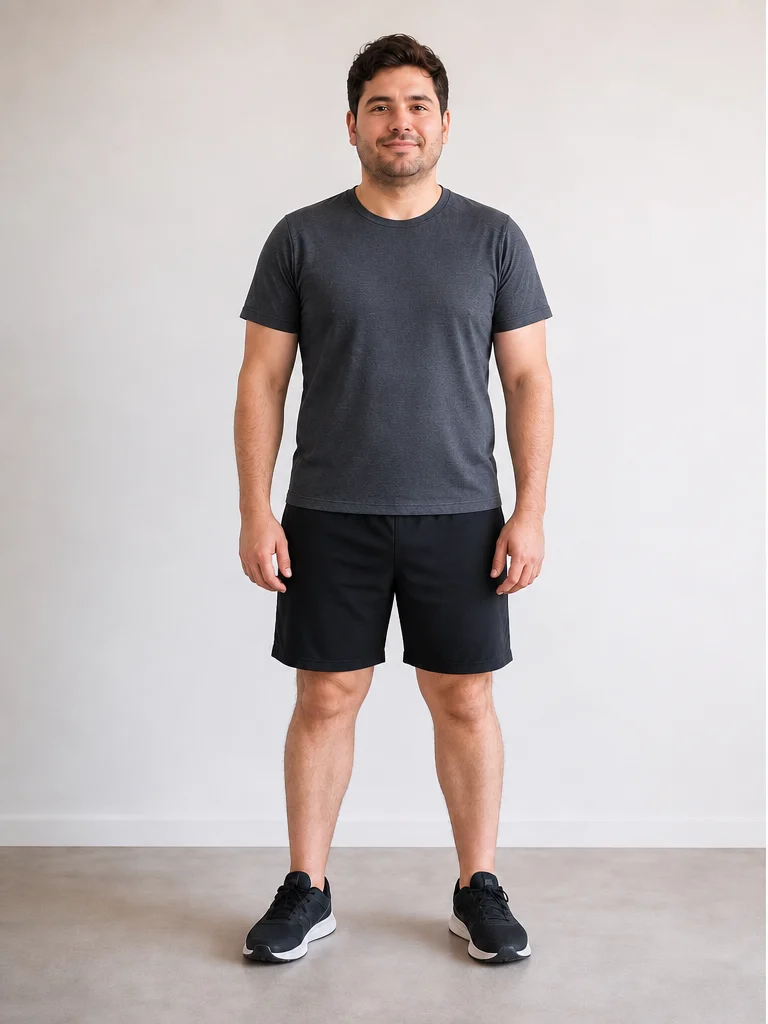
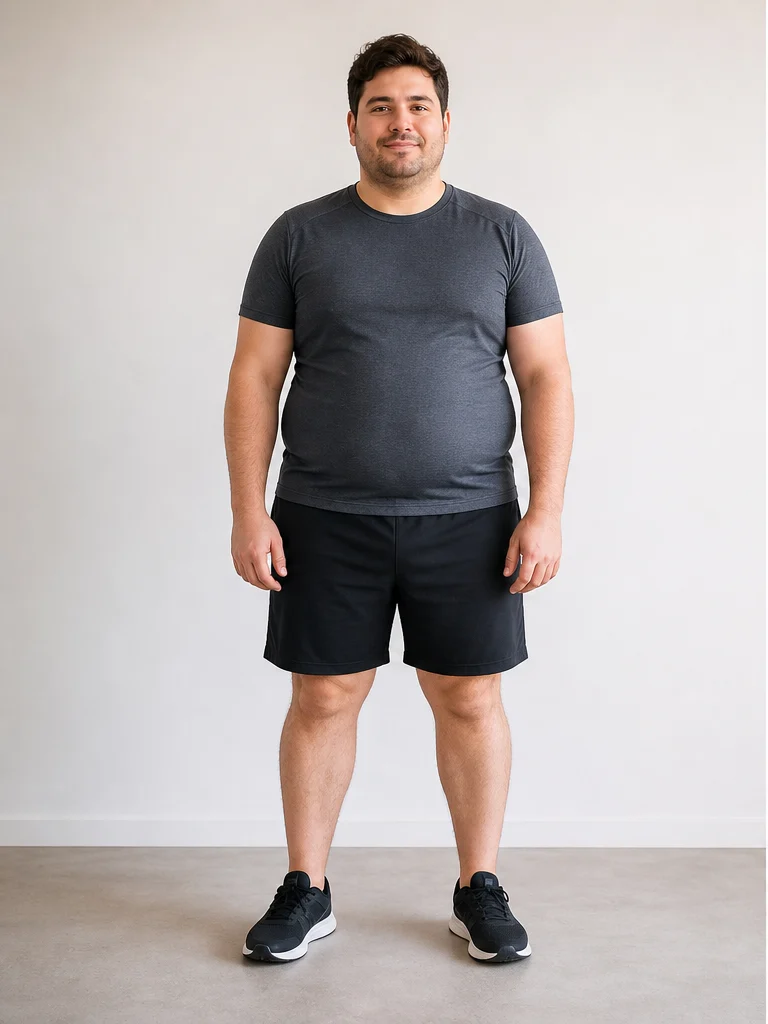 Now−40 lbs
The weight loss progression simulator shows the same photo at −10, −20, −30 and −40 lbs side by side, which is often more motivating than a single end state because each milestone is reachable.
What changes first when you lose weight?
Most people notice the change in their face and neck before anywhere else, because there is relatively little fat there and small changes alter the jawline. A University of Toronto study found that other people can detect a weight change in someone's face once it reaches about 1.33 BMI points — roughly 8 lb for women and 9 lb for men of average height — and that it takes about twice that to make a face look more attractive (University of Toronto).
- Face and neck: under-chin fullness shrinks, the jaw angle sharpens, cheeks look less round. More in how much weight you need to lose to see it in your face.
- Waist and clothes: belts move a notch, waistbands loosen — often before the mirror shows much.
- Midsection: many men lose visibly from the belly first; many women notice hips, thighs or chest first. Genetics decide the order, and you cannot spot-reduce.
- Hands, wrists and ankles: rings and watches loosen — a small but common early sign.
Why proportional “shrinking” looks fake
Most cheap simulators scale your whole body down evenly. Real fat loss is uneven — it comes off where you carry it. That is why our simulator asks where you hold weight (belly, hips and thighs, face and upper body, or evenly) before editing the photo.
What would I look like if I lost 10, 20, 50 or 100 pounds?
The same number of pounds looks very different on different people, so it helps to think in percent of body weight. The table below shows typical visible changes; your own result depends on height, starting body fat, muscle and genetics.
| Loss | On a 160 lb person | On a 250 lb person | What usually shows |
|---|---|---|---|
| 10 lb | 6% of body weight | 4% | Face and neck slightly leaner; clothes a little looser |
| 20 lb | 13% | 8% | Visible in the face, neck and waist; often a clothing size down |
| 50 lb | 31% | 20% | Looks like a different size category; jawline and collarbones much clearer |
| 100 lb | — | 40% | Transformative change; loose skin becomes likely, especially after age 40 |
Deep dives: what losing 20 pounds looks like and what you will look like after losing 50 or 100 pounds.
Is there an app that shows what you would look like if you lost weight?
Yes. Photo-based AI simulators — including AI Weight Loss Simulator — run in the browser, so there is nothing to install: upload a photo, choose how many pounds or kilograms to lose (or gain), pick where you carry weight, and get an edited before-and-after in under a minute. Avatar apps like Model My Diet and free 3D visualizers work from measurements instead of a photo.
There are separate versions tuned for men, women and face-only portraits, and you can also preview weight gain.
See yourself at your goal weight
Upload a photo, set a target, and compare your before-and-after in about a minute.
How do you get a realistic result?
- Use a front-facing, full-body or waist-up photo in even light, wearing fitted clothes. Baggy clothes hide the body the AI needs to edit.
- Pick a specific number, not “thinner”. In our own prompt testing, adjective-only instructions produced roughly the same small change no matter how strongly they were worded; a pound target fixes that.
- Tell it where you carry weight. Belly, hips and thighs, or face and upper body produce very different — and more believable — results.
- Keep skin realistic for big losses. For losses of 50 lb or more our simulator allows natural skin laxity and avoids fake six-pack abs.
- Compare stages, not just the end. A 10 → 40 lb progression is easier to believe and to act on.
How accurate is a weight loss preview?
No tool can tell you exactly how you will look, because the order in which your body loses fat, your skin's elasticity and how much muscle you keep are individual. A good simulator gives you a plausible, identity-preserving picture of the target weight — useful for motivation and goal setting, not a medical forecast. We explain the trade-offs in are weight loss simulators accurate?.
If you want a realistic timeline to go with the picture, the goal weight date calculator estimates when you would reach your target at a given calorie deficit. The CDC notes that people who lose about 1–2 lb per week are more likely to keep it off (CDC).
Frequently asked questions
Is there a free way to see what I would look like if I lost weight?
What would my face look like if I lost weight?
Can AI show what I would look like skinny?
Is a weight loss simulator the same as a slimming filter?
Does it work for men and women?
Sources
- University of Toronto — Losing weight can make you more attractive, experts say (Re & Rule, Social Psychological and Personality Science)Facial weight change of ~1.33 BMI points (≈8 lb women, ≈9 lb men of average height) is noticeable; roughly double that to look more attractive.
- CDC — Steps for Losing WeightPeople who lose about 1–2 lb a week are more likely to keep it off.
- Max Planck Institute for Intelligent Systems — Body Visualizer
- Model My Diet — virtual weight loss simulator
This article is for general information and visualization only and is not medical advice. Talk to a qualified healthcare professional before starting a weight loss plan.