
Weight Loss Stages
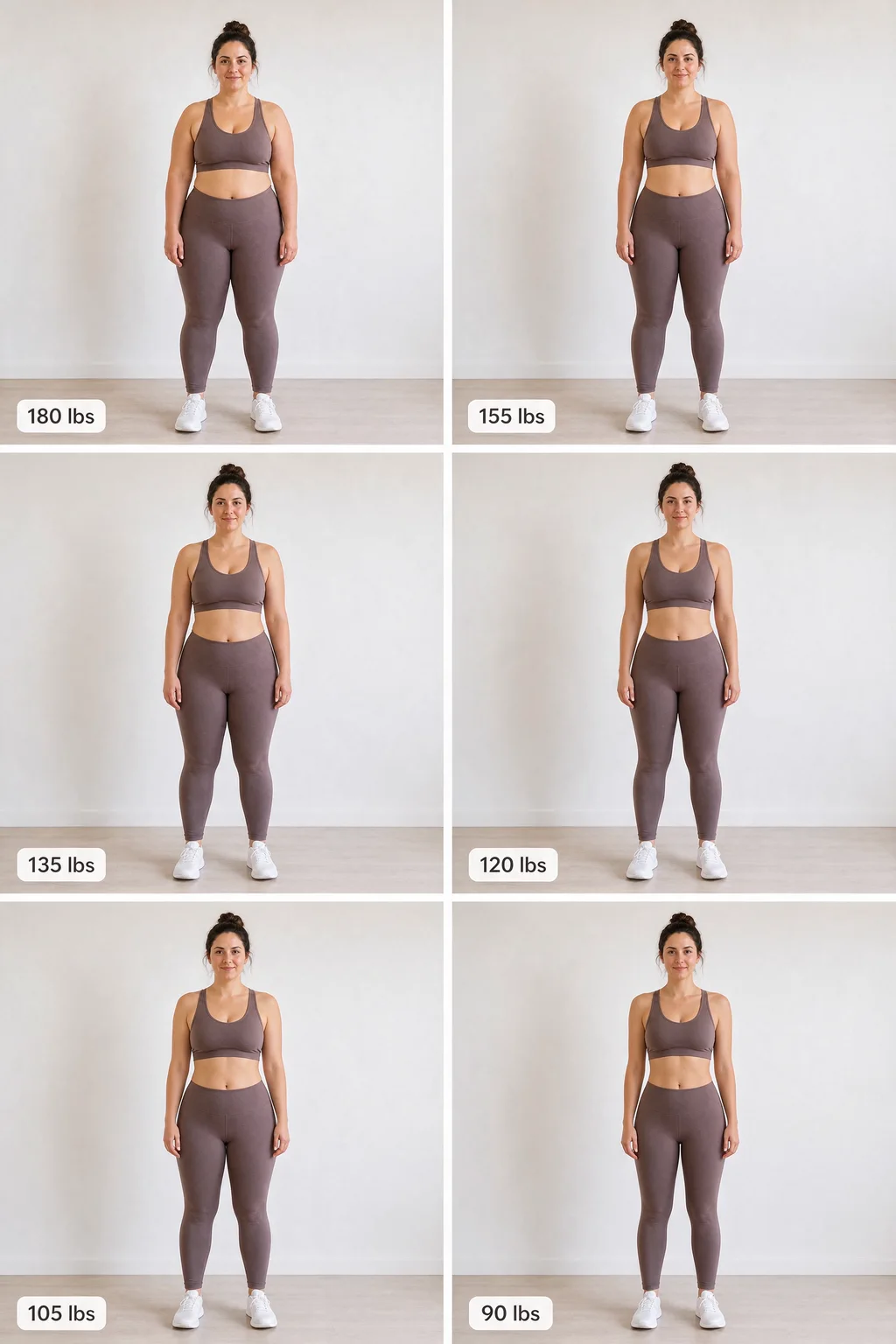
Turn one full-body photo into a single AI image of you at six weights — for example 180, 155, 135, 120, 105, 90 lbs — two per row, each one labelled. It takes about a minute, costs 20 credits (from $4.9), and keeps your face, outfit and background the same in every stage.
Last updated:
Drop a photo here or browse
Head to feet, standing, fitted clothes • JPG, PNG
Use a photo with clothes on. Swimwear or underwear photos are often blocked by the AI safety filter.
Your 6 stages
Where do you carry most of your weight?
Upload a photo to start
 Example
Your 6 stages show up here
- · One image, 2 per row, 3 rows — labelled with each weight
- · Same face, outfit and background in every stage
- · Weight comes off where you carry it
How to make a stage-by-stage weight loss photo
Three steps: upload a photo, enter two weights, generate. One labelled 2 × 3 grid comes back in 30–60 seconds.
- Upload a full-body photo. Head to feet, standing straight, fitted clothes, plain background. Swimwear photos are often blocked by the safety filter.
- Enter your current and goal weight. In lbs or kg, at least 25 lbs (12 kg) apart. The middle stages are rounded to the nearest 5, with bigger steps first — 180 → 90 lbs becomes 180 / 155 / 135 / 120 / 105 / 90.
- Choose where you carry weight, then generate. Belly, hips and thighs, all over, or face and upper body. Weight comes off those areas first, like it does on a real body, instead of shrinking everything by the same ratio.
The whole grid is drawn in a single generation, so lighting, outfit and framing stay consistent from the first panel to the last. Download it at 1536 × 2304 px.
Who the 6-stage progress grid is for
Anyone who wants to see the route, not only the finish line.
Starting a diet or a GLP-1
See each checkpoint on your own body before the first week — 25 lbs, 45 lbs, 60 lbs down — instead of one far-away “after”.
Creators doing the trend
The 2-per-row progress grid people post on TikTok and Instagram, made from one photo, with every weight labelled for you.
Coaches and their clients
Show a client what a realistic route looks like stage by stage, in kg or lbs, without a photo shoot every month.
What are the stages of weight loss, and how long does each take?
At a sustainable 1–2 lbs a week, a 180 → 90 lb goal takes about 45–90 weeks. The stages shrink from 25 lbs at the start to 15 lbs near the goal, because early weeks also drop water and the pace slows as your body gets lighter. The CDC notes people who lose weight at that pace are more likely to keep it off.
| Stage | Weight | Lost so far | At 1–2 lbs/week |
|---|---|---|---|
| 1 | 180 lbs | Start | — |
| 2 | 155 lbs | 25 lbs | 13–25 weeks |
| 3 | 135 lbs | 45 lbs | 23–45 weeks |
| 4 | 120 lbs | 60 lbs | 30–60 weeks |
| 5 | 105 lbs | 75 lbs | 38–75 weeks |
| 6 | 90 lbs | 90 lbs | 45–90 weeks |
The body stages of weight loss follow a rough order. The face shows it first — a University of Toronto study found others notice a change in the face after about 8 lbs for women and 9 lbs for men of average height. The waist and clothing size follow around 10–20 lbs, and the overall shape of the arms, hips and thighs changes clearly past 30–50 lbs.
The stages of noticing weight loss lag the scale. Early weeks drop water as well as fat, and the mirror adapts with you, which is why many people say they can't see 20 lbs on themselves. A labelled grid of your own photo gives you a fixed reference for what each checkpoint looks like.
Can ChatGPT or Gemini make this grid instead?
Yes — with a good weight loss prompt for ChatGPT or Gemini you can get a similar 6-panel image on their free tiers. The trade-off is control: chat models often change the face or outfit between panels, mislabel weights, or decline body edits.
Prompt to paste with your photo
Using my photo, create one image with 6 equal panels (2 columns × 3 rows). Every panel shows me with the same face, outfit, pose, background and lighting. Label the panels 180 lbs, 155 lbs, 135 lbs, 120 lbs, 105 lbs and 90 lbs, left to right, top to bottom, and make my body gradually slimmer in each panel. Keep it photorealistic.
| Option | What you get | Cost | Best for |
|---|---|---|---|
| This 6-stage grid | One 2 × 3 image, weights computed and labelled, body type aware | 20 credits | Sharing the whole route in one picture |
| Progression timeline | 4 separate full-size milestone photos, stitched into a row | 40 credits | Bigger, sharper image per milestone |
| Single before & after | One edited photo at one target, with a slider | 10 credits | Seeing your goal weight up close |
| ChatGPT / Gemini prompt | A similar grid; identity and labels vary run to run | Free tier limits | Trying the idea before paying |
Stage-by-stage weight loss photo FAQ
Price, weights, privacy and how the six stages are chosen.
What are the stages of weight loss?
How do I make a picture of myself at different weights?
How are the six stages chosen?
Is the 6-stage photo grid free?
Can I go from 180 to 90 lbs, or use kg?
Do the stages of weight loss pictures work for women and men?
Is my photo safe? Is it uploaded?
How accurate is a stage-by-stage weight loss photo?
Does it work on iPhone and Android?
Want to know when you could reach each stage? Try the goal weight date calculator. Check whether a goal is in a healthy range with the BMI calculator. Prefer one result at a single target? Use the AI weight loss simulator.
Six checkpoints, one picture
Your photo, your numbers, every stage labelled. One grid is 20 credits — from$4.9, no subscription, and credits never expire.